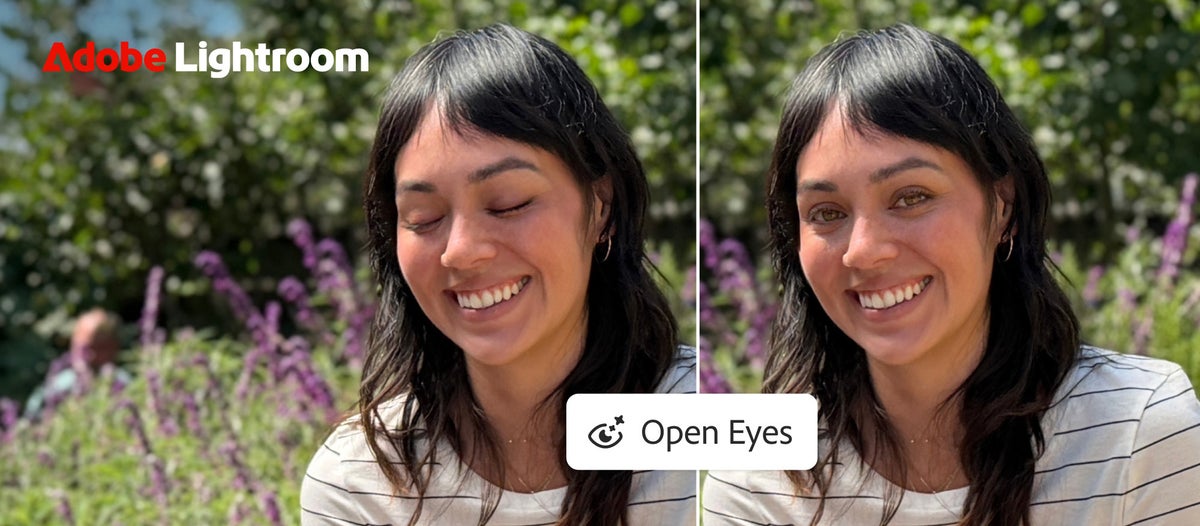
Adobe announced Open Eyes on October 19 for Lightroom on mobile. When the app detects someone with closed eyes, it offers an Open Eyes Quick Action. Tap it and generative AI creates an open-eyed version rather than requiring a tedious round trip through desktop Photoshop. For family portraits, travel snapshots, or a once-only group shot, that is a very practical capability.
The interesting detail is identity matching. Adobe says that when other pictures of the person are already in the Lightroom library, the feature can use them to better match eye color, shape, and size. Without that context, the software can still attempt a fix, but the result deserves a close inspection: generated eyes may be convincing at phone size and odd at 100 percent.
This is a mobile Lightroom feature, not a promise that the same button exists in Lightroom Classic or desktop Lightroom. Adobe’s announcement also highlights Generative Expand, which can extend the frame when a composition is too tight for a new aspect ratio. That is separate from Open Eyes and may use different generative-credit rules.
There is some conflicting information about cost: Adobe’s own announcement describes the Open Eyes result as free, while independent hands-on coverage describes generative-credit prompts or limited free trials in particular accounts. The reliable action is to check the cost shown in your app before tapping Generate; do not assume unlimited free edits.
A useful test is to take an older group photo with one blink, import it to Lightroom mobile, run the suggested action, and compare the original and edited versions at full resolution. Look for mismatched gaze, asymmetric eyelids, or a face that no longer resembles the person. Keep the original and treat a synthetic fix as an edited image when authenticity matters.
What to do: Open Lightroom on the iPhone or iPad, find a blinked portrait, and test Open Eyes while preserving the original.